


Breaking News: Local & Alerts
4.53.48K Reviews
App Specs
- Version
- 11.1.22
- Updated On
- License
- Free
- Downloads
- 10,000,000+
- Developer
- Beloud.com
- Categories
- News & Magazines
- Platform
- Android
Screenshots




 Analysis by AppCompare
For me, a local news app is most useful when it helps me answer two questions quickly: what has happened nearby, and is it relevant to what I need to do today? Breaking News: Local & Alerts is built around that mix of neighborhood coverage and urgent headlines. It is a free news and magazines app from Beloud.com, and its focus makes it a practical option if you want a quick check-in rather than a full replacement for every news source you read.
What free access means in practice
The app is free to download and use, so trying it does not require a purchase. That is a straightforward benefit for anyone who wants to see whether local alerts fit their routine before committing to a news subscription elsewhere. I would judge its value by whether the stories and alerts it surfaces are relevant to my area, not simply by how many headlines appear in a feed.
Its reach suggests that many readers find a use for it: it has more than ten million installs, and its average rating is 4.5 from around 564,000 ratings. Those figures are useful context, but they cannot tell me whether the coverage will be useful in your neighborhood. Local relevance is personal; the best test is whether the app regularly surfaces information you would otherwise have to hunt for.
Where the app can earn a place in your routine
The clearest value is convenience. Instead of checking several local sources separately, I can use a single app as a starting point for nearby developments and broader breaking stories. That does not make it a substitute for careful reporting, but it can help me notice a story early and decide whether it deserves a closer look.
A realistic routine might be checking the feed over breakfast, then glancing at an alert before leaving home. If something affects a route, a public event, or the neighborhood, that early heads-up can prompt me to verify details before changing plans. I would treat an alert as a cue to investigate, especially when a decision depends on exact timing or official instructions.
Trade-offs to keep in mind
Breaking alerts are useful only when their timing and subject matter suit you. Too many notifications can turn a helpful news habit into background noise, while turning them off entirely may mean missing the kind of update you installed the app for. I recommend deciding in advance which alerts deserve an interruption and checking the feed manually for everything else.
There is also a difference between a fast headline and a complete account. A short alert can tell me that a story is developing, but it may not include context, confirmation, or the details needed to make a consequential decision. For emergencies, travel changes, or other time-sensitive matters, I would use the app to spot a topic and then check the relevant official source before acting.
Worth Reading Before You Choose

Baby Panda World Brings Quick Play to Modern Phones, but Its Game Library Feels Busy

ESPN’s Live Game View Makes Following Close Games Easier

QuizzLand Review: A Good Fit for Short Trivia Breaks, Not Every Player

Basketball Stars: Multiplayer Is Fast, but Can It Recover When Matches Go Wrong?

WEBTOON Turns Phone Updates Into a Better Reading Routine

Link to Windows Runs on Shared Habits, Not Social Feeds
A closer look at the everyday experience
I use this section to look beyond the first headline and consider how a local-news feed can fit into ordinary routines without turning every update into an interruption. A useful way to judge the experience is to notice which stories actually change what you do, then shape your reading around those moments.
Getting Started with Breaking News
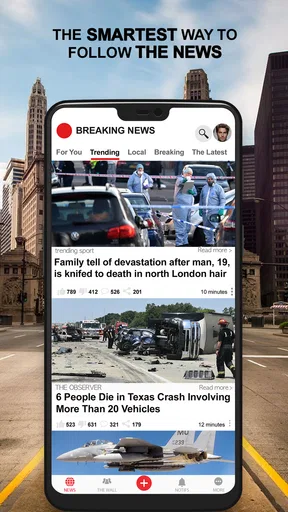
When you first download Breaking News: Local & Alerts, the setup is smooth and straightforward. The app is available for both Android and iOS, so no matter what device you’re rocking, you’re covered. Once installed, you're greeted with a clean, intuitive interface that doesn’t try to overwhelm you with too much information at once. I found the layout to be pretty user-friendly, with clear sections for different types of news.
Customizing Your News Feed
One of the standout features of this app is the ability to customize your news feed. I love that I can choose which topics I'm interested in, whether it's politics, sports, entertainment, or tech. You can even set up alerts for your local area, which is super handy for staying on top of community news. The app allows you to toggle notifications on and off, so you can avoid being bombarded with alerts when you're busy. It’s like having a personal news assistant right in your pocket!
Real-Time Alerts
Let’s talk about the real-time alerts feature—it’s honestly a lifesaver. I’ve found it incredibly useful to receive instant updates on breaking news. Whether it’s a major world event or a local traffic jam, the app ensures you’re not left out of the loop. The alerts are concise and to the point, so you can quickly decide if it’s something you need to dive deeper into.
Making alerts useful without letting them take over
A small habit can make the notification setup more valuable: give each alert a quick relevance test. Does it affect where I am, a topic I follow, or a decision I need to make soon? If not, I can leave it for a scheduled feed check rather than letting every headline interrupt work or downtime. This is especially useful for people who want neighborhood awareness but do not want their phone to become a constant news ticker.
For a family or shared household, I would also avoid assuming one person’s alert settings suit everyone. Someone commuting across town may care about different local updates from someone who mostly reads at home. Using the app as a personal filter, then sharing a specific story when it matters, is more manageable than expecting every reader to follow the same stream.
Reading Experience
The reading experience on the app is pretty seamless. Articles load quickly, and the text is easy on the eyes. Plus, the app doesn’t bombard you with ads, which is a huge plus in my book. I also appreciate the ability to save articles for later. It’s perfect for when you stumble upon a juicy headline but don’t have the time to read it just then.
Using saved stories as a follow-up list
Saving an article is most useful when I treat it as a reminder, not as proof that I have already understood the story. If I spot a developing local issue while busy, I can save it, return when I have time, and compare the fuller article with any later updates. That workflow is better than relying on a brief notification that may become outdated as a story changes.
It also helps to separate “interesting” from “actionable.” I might save a feature or background story for a quiet moment, while opening a practical update right away. This simple distinction keeps the saved list from becoming a pile of headlines I never revisit, and makes the app more useful for readers who dip in and out during the day.
How it compares with other ways to follow news
Compared with reading a single newspaper or broadcaster’s app, a local-and-breaking-news tool is appealing when I want a broader first glance and do not want to choose one publication as my only entry point. A dedicated outlet may be better when I care about its reporting depth, editorial perspective, or ongoing coverage of a particular subject. I would use this app to notice and track stories, then turn to a trusted source for analysis or confirmation.
Social feeds can surface local developments quickly too, but they mix reporting with personal posts and commentary, so it can take more effort to work out what is established. This app offers a more news-focused starting point. Still, no feed should be treated as a complete picture: for a major local announcement, checking the organization or public authority involved is the sensible final step.
Who is likely to get the most from it?
I think it fits people who want a quick view of nearby news alongside major breaking stories, especially readers who prefer to tailor topics and control whether notifications interrupt them. It can also suit someone who has recently moved and wants a simple way to keep an eye on community developments while learning which local issues matter to them.
It is less suited to readers who want one publication’s deeply reported coverage, a strictly chronological stream, or a quiet experience with no push alerts at all. If you only follow a narrow specialist subject, a dedicated publication may be more focused. And if a headline would influence a serious decision, I would not rely on a short alert alone; I would read the story and check the primary source.
Platform, age suitability, and ongoing support
The app is listed for Android devices running version 6.0 or later, and its current release is 11.1.22. It is rated for Everyone, which makes its stated age classification broad, though I would still help younger readers judge the tone and importance of individual news stories. Beloud.com is the developer behind it.
There are around 3,500 written reviews alongside the much larger pool of ratings. I see that as a reminder to consider both broad popularity and the practical fit for my own habits: an app can be widely used and still not deliver the local coverage or notification balance I want. Since news apps can change over time, I would also revisit the settings occasionally rather than assuming my first setup will remain ideal.
Staying Social
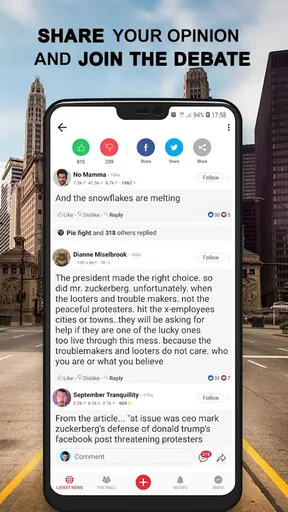
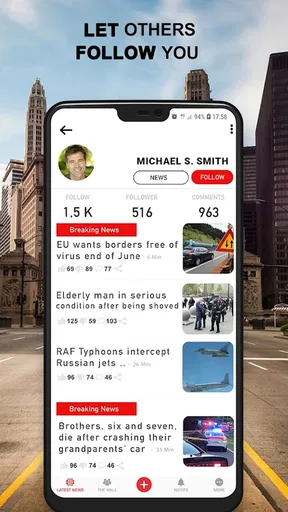
If you love sharing interesting stories with friends, Breaking News: Local & Alerts makes it super easy. With just a tap, you can share articles on social media or send them directly to a friend. It’s a great way to spark conversations and stay connected over shared interests.
Sharing with context
When I pass along a breaking story, I try to include why I think it matters instead of sending only a dramatic headline. That is particularly important for local news, where a small detail such as the affected area or timing can change how a friend interprets the update. Sharing the article rather than a paraphrased alert gives the other person a better chance to see the surrounding context.
I would also use sharing selectively. It is handy for coordinating around a useful community update, but forwarding every notification can spread uncertainty as quickly as information. If a story is still developing, I prefer to say so plainly and wait for a more complete account before treating it as settled.
Conclusion
All in all, Breaking News: Local & Alerts is a solid choice for anyone looking to stay informed without the hassle. The customization options, real-time alerts, and smooth interface make it a must-have app for news junkies and casual readers alike. Whether you're interested in global news or just want to keep tabs on your local community, this app has got you covered. So, if you’re ready to take your news experience to the next level, give this app a try. Trust me, you won’t regret it!
My buy-or-skip verdict
Because access is free, I would try it if local awareness and quick breaking updates are things I genuinely want in my day. The app’s value is not that it replaces every paper, broadcaster, or official channel; it is that it can make the first step of keeping informed more convenient. I would keep it if the local feed feels relevant and the alerts remain useful after I adjust them.
I would skip it if I already have a reliable routine built around a local news outlet, or if notifications tend to distract me more than they help. For readers who do install it, my practical advice is to set a small number of meaningful topics, keep alerts only for updates that may change plans, and use saved articles for stories that deserve a slower read. That gives the app a clear role: a convenient early-warning and discovery tool, with deeper reading and verification handled when the story calls for it.
Pros
- Timely notifications for urgent news.
- Customizable news categories.
- User-friendly interface.
- Local and global news coverage.
- Offline reading mode available.
Cons
- Ads can be intrusive at times.
- Limited customization for alerts.
- Occasional lag in app loading.
- Some news sources may be biased.
- Requires stable internet for updates.
FAQs for Breaking News: Local & Alerts
What features does the Breaking News: Local & Alerts app offer?
The Breaking News: Local & Alerts app provides real-time updates on local and global news. Users can customize alerts for specific topics or regions, ensuring they receive only the news that matters to them. The app also includes a user-friendly interface, easy navigation, and options to share articles via social media.
Is the Breaking News app free to use?
Yes, the Breaking News: Local & Alerts app is free to download and use. However, it may offer in-app purchases or premium features that require payment. These features might include ad-free browsing, exclusive content, or enhanced customization options.
How does the app ensure the news is accurate and reliable?
The app aggregates news from a variety of reputable sources to ensure accuracy and reliability. It employs algorithms to filter out misinformation and emphasizes content from well-established news organizations. Users are encouraged to cross-check information and provide feedback on any discrepancies.
Can I customize the alerts and notifications in the app?
Yes, the app allows you to fully customize alerts and notifications. You can select specific topics, regions, or even individual news sources. This customization ensures you receive timely updates on the subjects that interest you most, without being overwhelmed by unnecessary notifications.
Does the app support offline reading?
Yes, the Breaking News: Local & Alerts app supports offline reading. You can save articles to your device and access them later without an internet connection. This feature is especially useful for users who want to read news on the go or in areas with limited connectivity.


